Page 1 of 1
problem : PWP crashed while using the lines, arrows, text tool
Posted: December 17th, 2025, 9:33 pm
by pierrelabreche
PWP crashed while using the lines, arrows, text tool
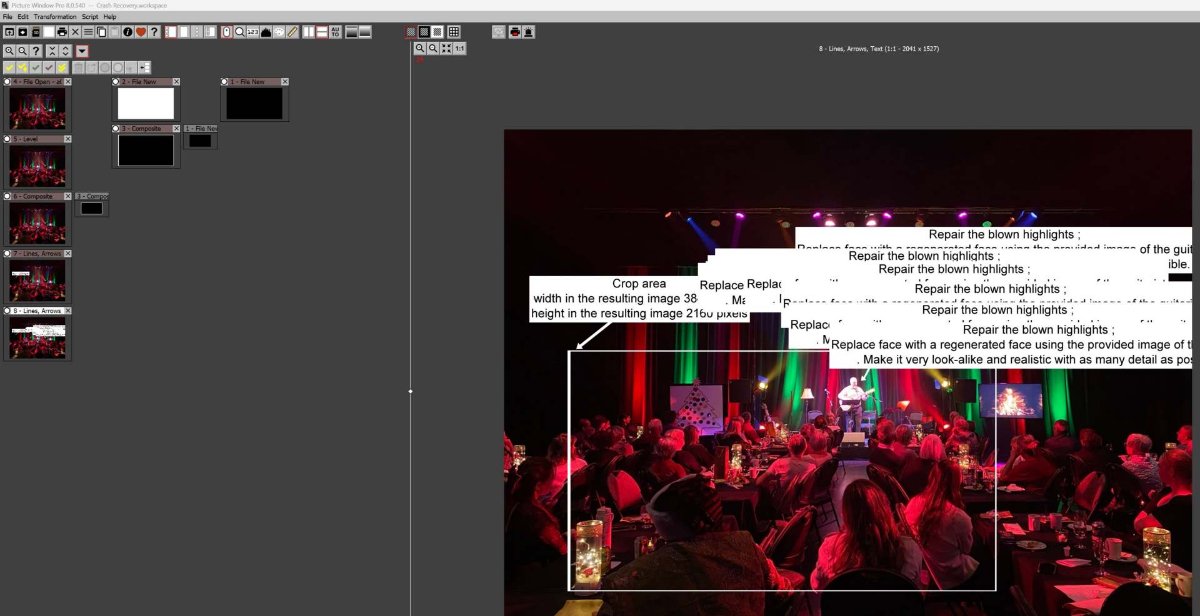
- 2025-12-17 202539 PWP crash using Line tool v1.jpg (109.46 KiB) Viewed 13000 times
Prior to the crash, the tool started misbehaving, creating multiple text images for each point in the multi-sergment line
Re: problem : PWP crashed while using the lines, arrows, text tool
Posted: December 18th, 2025, 7:03 am
by jsachs
One thing to watch out for -- when you pause a batch workflow at a breakpoint, the only actions you should take are to adjust the settings of the current transformation. To enforce this I disable the main menu and tool bars as well as the image browser. If you however find some other way around this limitation, for example via keyboard shortcuts, it can cause serious problems.
In most cases there is no easy way to fix a problem like this unless you can find a way to reproduce it reliably and you give me all the steps. Once I can reproduce a problem here I can usually fix it quickly. Lacking this I can only try to imagine what sequence of events is causing the crash and try a lot of scenarios, most or all of which typically don't cause a problem.
Re: problem : PWP crashed while using the lines, arrows, text tool
Posted: December 18th, 2025, 9:43 am
by pierrelabreche
This was not batch processing, I was working on a composite.
When the crash happened. I was trying to adjust the shape of arrowed line associated with the text box. I wanted to delete points in the line, but instead, new copies of the text box and arrowed line kept appearing.
Re: problem : PWP crashed while using the lines, arrows, text tool
Posted: December 18th, 2025, 11:51 am
by jsachs
Can you provide a repeatable scenario that causes the problem?
Re: problem : PWP crashed while using the lines, arrows, text tool
Posted: December 22nd, 2025, 4:18 pm
by pierrelabreche
I have not been able to reproduce the crash.
However, I was trying to edit the curved line attached to a text box. Help states
Selecting a line
Clicking on the input image on an existing control point selects the line of which the control point is a part. The control points in the current line are displayed as larger, filled circles so you can tell which line is selected
I was unable to identify the control points. My "muscle memory" using Curves Control led me to try Shift-Click to add points to the arrowed line.
This of course led to the creation of multiple instances of the Text box with arrow-headed line.
I am still unable to select the line of the text box with the intent of adding control points to control its shape.
I am confused as a user by the ergonomics of Shift-click with different outcomes ( in curve transformation control and in line creation using the Lines, arrows, text tool ).
Re: problem : PWP crashed while using the lines, arrows, text tool
Posted: December 22nd, 2025, 6:02 pm
by jsachs
There is an extensive section near the end of the help for the transformation that describes how to edit lines and text, called Editing lines and control points.
When you shift-click to create a new line segment, it is created with a copy of the settings from the previous segment, including the text box, if any. To remove the text box, right-click on the T icon and select Remove Text from the menu.
The position of the text box is determined by its alignment setting. The size and shape is determined by size of the text inside although you can also specify the amount of space to leave around the text.
Re: problem : PWP crashed while using the lines, arrows, text tool
Posted: December 22nd, 2025, 8:44 pm
by pierrelabreche
Thanks for the very clear explanations.